How to Post on Twitter Professionally
Part Two

Creating and posting original messages (content) on Twitter is just one part of the social media job. Curating and posting messages (content) written and created by others is another part.
Curating is the act of sharing other people’s (or organization’s) content on your social accounts.
When you curate the content of others, you:
- Build your authority
- Engage your industry
- Grow your social proof
And how do you do those things?
- Follow and Retweet thought leaders
- Follow hot topics/trends – hashtags and “trending topics”
- Join conversations – threads, Twitter Chats, hashtags
- Share current industry news – trade publications, news sites
- Encourage reviews of products – and re-share them
Items 1, 2, 3 and 4 will certainly build your authority and engage your industry. The side effect (or implication) will be that your audience will trust you as an arbiter of solid and reliable information – not just a bot or a troll. Item 5 will further your trust-o-meter with customers because studies have shown that we tend to trust the reviews of other “normal people like ourselves” over anything that a brand might say.
So, what can you curate and how do you do it?
It’s fairly simple, but it mostly involves time and effort – again?? – on your part.
It means staying on top of pertinent news in your industry; scrolling through your own feed to see what’s happening out there; popping over to “industry leaders’” accounts and finding out what they’re saying; actually checking the hot hashtags and trending topics; reading the industry newsletters you’ve signed up for and sharing some of the content; and doing the same on/from the websites of your industry.
Here are some ideas:
- Current news stories
- Recent posts by thought leaders and industry professionals
- Notifications of events industry events – all those virtual conferences, wow!
- Infographics highlighting industry trends and topics (visuals!)
- Videos and Audio
And don’t forget the fun stuff:
- Humourous, and thoughtful content always gets a hit and breaks up the seriousness – but make sure it is tone-appropriate for you and your brand
And, once you’ve spotted some timely and relevant content, share it across your accounts/platforms.
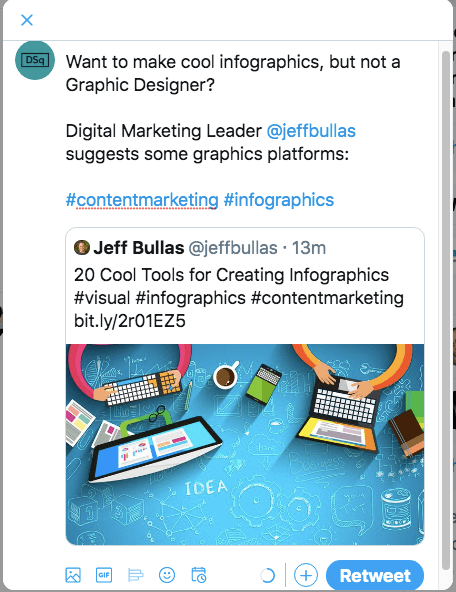
Retweeting a Post from Inside Twitter:
- Click the Retweet symbol
- Use Retweet WITH COMMENT – otherwise you’ll just repost the original and not have any of your own copy in the post.
Tweeting from Another Source/Website
- Copy the URL
- Back in Twitter, click the Tweet button (desktop) or the +Quill (mobile)
- The Composer window will be blank; start by writing your copy, similar to an original tweet
- Then, paste in the URL
- (A boxed link will appear with a highlight and image from the website)

You’ll notice a couple of things:
- Any link you pasted in will NOT appear in the final tweet, once you’ve posted it;
- Depending on how you’ve posted (retweet or copied-URL) the final tweet will look slightly different once it goes out to the feed
The rule of thumb is that bigger images capture more attention and are more likely to get clicks or likes.
And then, monitor the actions people take on these posts just like you do for original posts – and make sure you respond and thank people just like before.
A Word on Scheduling
This applies to both original and curated content. You want to make sure you’re posting to social platforms when you’re fairly certain that eyeballs will be on the screens.
For Twitter, this is particularly important as the feeds fill up every second. What was timely news five minutes ago is now old news. So think wisely and carefully about when you’re going to post. Do your research. You can easily google “best times to post on [platform]” and you’ll get a plethora of options.
Hootsuite offers a terrific set of times based on their users’ activity and it’s broken up for many of the most common platforms. Or you can check another industry leader, SproutSocial, for best times on Twitter, alone.
And you may want to consider investing some time (and possibly money) in a content scheduling platform like Hootsuite or Buffer.
Both of these allow you to “pile up” a content calendar that only shoots out your posts at times that you have specifically set up. Also, they allow you to tailor your posts to each social platform, and only hit send (or schedule) once and it’s done.
There will be a separate post on The Herald about these platforms.
So, make sure you’re offering a healthy dose of both original, created content and well-chosen, curated content to help keep you twitter feed active.
 Digital Esquire